The ArchiMate application layer
Nine element types describe the software in an ArchiMate model. Here they are on one small clinic booking system: what does the work, the work itself, and the data.
11 min readArchiMate 3.23 of 7
The short answer
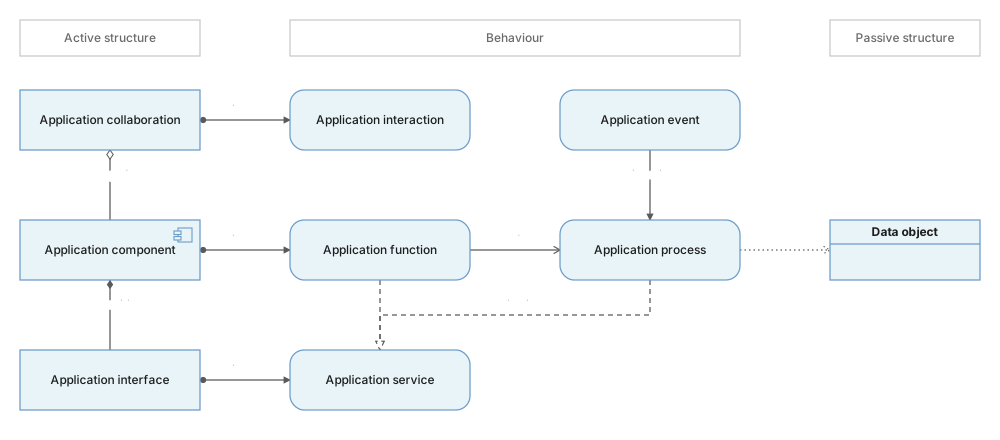
- The application layer describes software: the applications, what they do, what they offer, and the data they handle. ArchiMate 3.2 gives it nine element types.
- Active structure is the component, the collaboration and the interface. Behaviour is the function, process, interaction, event and service. Passive structure is the data object.
- A function groups behaviour by what it does. A process puts behaviour in order and ends in a result. A service is the outside view of either one.
- Application services and interfaces serve the business layer, and data objects realize business objects. Technology services serve the software, and artifacts realize it.
01The short answer#
The application layer is the part of an ArchiMate model that describes software. It shows the applications an organisation runs, what they do, what they offer to people and to other systems, and the data they handle. It sits between the business layer above it, where people and their work are described, and the technology layer below it, where servers and networks are described. ArchiMate 3.2 gives the application layer nine element types.
Like every core layer, it sorts its elements into three aspects. Active structure is what does the work. Behaviour is the work itself. Passive structure is the data the work reads and writes. The figure above shows the nine types in those three columns. The layers and aspects article explains the grid behind this.
This article uses one example all the way through: a small clinic. Patients book visits on a web page. A receptionist books visits for patients who phone. When a new patient books for the first time, the clinic also opens a medical record for them. Here is the clinic's application layer, with every one of the nine types in it.
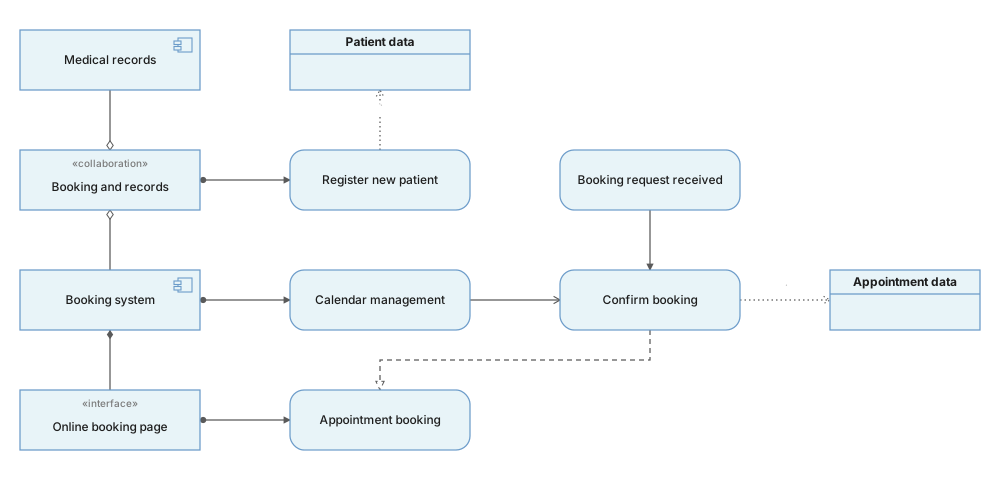
The next three sections take the figure apart one aspect at a time. The section after them adds the business layer above and the technology layer below.
02Active structure: what does the work#
Active structure elements are the things that act. In the application layer they are pieces of software and the points where people or other systems can reach them. The notation column describes the icon ArchiMate 3.2 gives each type. It is drawn in the top-right corner of a rectangle, or on its own as a small symbol.
| Element | Notation | What it means |
|---|---|---|
| Application component | a box with two small tabs on its left side | A modular, replaceable piece of software. In the clinic: Booking system and Medical records. |
| Application collaboration | two overlapping circles | Two or more components that work together for a shared piece of behaviour. In the clinic: Booking and records, the two systems working together when a new patient registers. |
| Application interface | a small circle on a short line | A point of access where a user, another application or a node can use the component's services. In the clinic: Online booking page, and a Reception screen for the receptionist. |
How big is a component? Big enough that people name it in a meeting, and something you could replace with a different product. "Booking system" passes that test. "The date picker" does not, because it is a part of the booking system's code. For a closer look inside one system, use a UML component diagram.
An interface is part of a component, so it is usually drawn with composition from the component: a line with a filled diamond on the component's end. One component can have several interfaces. The booking system has a web page for patients and a screen for the receptionist, and both reach the same service.
A collaboration is the least used of the three. Draw one only when two components really do something together that neither does alone. It joins its members with aggregation (a hollow diamond), because each component also exists outside the collaboration.
03Behaviour: what the software does#
Behaviour elements are the work itself. Each one is performed by an active structure element, joined to it by assignment: a line with a dot on the performer and an arrowhead on the behaviour. The application layer has five behaviour types.
| Element | Notation | What it means |
|---|---|---|
| Application function | a chevron pointing up, like a bookmark | Automated behaviour grouped by what it does, with no fixed order. In the clinic: Calendar management, everything the booking system does with free and taken time slots. |
| Application process | an arrow pointing right | A sequence of automated steps that leads to a result. In the clinic: Confirm booking, which checks the slot, saves the appointment and sends a confirmation. |
| Application interaction | a circle split into two halves | Behaviour that two or more components perform together. In the clinic: Register new patient, which needs both the booking system and the medical records system. |
| Application event | a flag with a notch cut into its left end | A change of state that behaviour reacts to. In the clinic: Booking request received. |
| Application service | a rounded box with fully round ends | Behaviour offered to the outside, named by what the user gets. In the clinic: Appointment booking. |
Function or process? This is the question beginners ask most. A function answers "what does it do?". A process answers "in what order?". If you can number the steps and name the result at the end, it is a process. If it is a group of related abilities that run whenever they are needed, it is a function. Calendar management has no first step. Confirm booking does. A function can serve a process, which means the process uses it: Confirm booking uses Calendar management to check that the slot is free.
Service or the behaviour behind it? A service is the outside view. The function or process is the inside view, and it realizes the service, which means it is what makes the service real. Patients see Appointment booking. They never see Confirm booking, and they do not need to. An interface is assigned to the service it offers: the Online booking page is where patients use Appointment booking.
Events start things. An event takes no time. It triggers behaviour, drawn as a solid line with a filled arrowhead, and a process can also trigger an event when it finishes. Booking request received triggers Confirm booking.
04Passive structure: the data#
The application layer has one passive structure type: the data object, which is data structured for automated processing. It is drawn as a rectangle with a band across the top, the same shape as a business object but in the application colour. In the clinic there are two: Appointment data and Patient data.
Behaviour reaches data through the access relationship, a dotted line. The line always runs from the behaviour to the data. Its arrowhead shows which way the data moves: an arrowhead at the data object means write, an arrowhead at the behaviour means read, arrowheads at both ends mean read and write, and no arrowhead means the direction is not stated. In the clinic figure, Confirm booking writes Appointment data and Register new patient writes Patient data.
Keep data objects at the level of business meaning: "Appointment data", not "the appointments table". If you need fields, keys and types, that belongs in a database schema or a UML class diagram, not in an ArchiMate view.
05How it connects to business and technology#
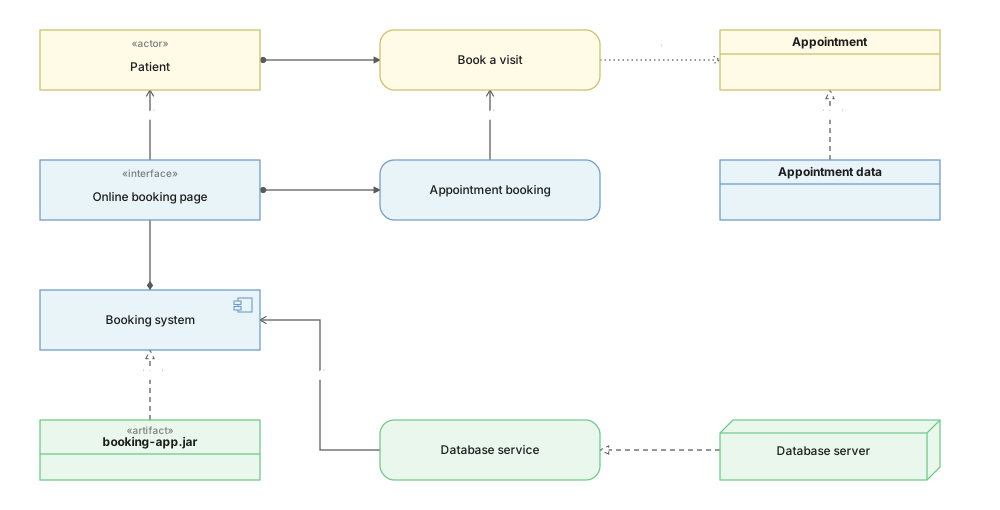
The application layer is rarely drawn alone. In most views its job is to show which software supports which business work, and what that software runs on. Two relationships do most of this. Serving means "is used by": a solid line with an open arrowhead pointing at the user. Realization means "makes real": a dashed line with a hollow triangle pointing at the more abstract element.
| Element | Notation | What it means |
|---|---|---|
| Serving the business | An application service serves a business process, function or role. An application interface serves a business actor or role. Here: Appointment booking serves Book a visit, and the Online booking page serves Patient. | |
| Realizing the business | A data object realizes a business object. An application process can realize a business process when the software does all of that work alone. Here: Appointment data realizes Appointment. | |
| Served by technology | A technology service or technology interface serves an application component. Here: Database service serves Booking system. | |
| Realized by technology | An artifact, the file that gets deployed, realizes an application component or a data object. Here: booking-app.jar realizes Booking system. |
All of these pairs are allowed by the relationship table in Appendix B of the ArchiMate 3.2 specification. Notice that Booking system does not connect to Book a visit directly. The service sits between them, and that is on purpose: the business reader cares about what the software offers, not about which system it is.
You will sometimes see a component drawn serving a business process directly. That is a derived relationship, a shortcut through the service. It is legal, but it hides the service, so use it only in a view where the service does not matter.
06Common mistakes#
- Drawing a service as a component. If you cannot point at it running, it is not a component. "Appointment booking" is what the system offers; "Booking system" is the system.
- Starting the access line at the data. Access always runs from the behaviour to the data object. The arrowhead says read or write; the direction of the line itself never changes.
- Reversing realization between data and business. Appointment data realizes Appointment, not the other way round. The more concrete element realizes the more abstract one.
- Skipping the service. A line from Booking system straight to Book a visit tells the reader that something helps, but not what. Draw the service and let it carry the name the business uses.
- Using an application process for work a person does. If the receptionist does the step, it is a business process. An application process is behaviour the software does on its own.
07Check yourself#
Three short questions about the clinic. Try each one before you open the answer.
1. The clinic wants to send a text message reminder one day before each visit. At the right time the booking system notices a reminder is due, and then it sends the message. Which application layer elements would you add?
Show the answer
2. Is the Reception screen an application component or an application interface?
Show the answer
3. The booking software supports the business process Book a visit. Do you draw serving or realization between the application layer and that process?
Show the answer
In one line each
- 01The application layer describes software: what it is, what it does, what it offers and what data it uses.
- 02Active structure: component, collaboration, interface. Behaviour: function, process, interaction, event, service. Passive structure: data object.
- 03A process has steps and a result; a function does not. A service is the outside view of either.
- 04Access always runs from behaviour to data. The arrowhead shows read or write.
- 05Lines between layers usually point up: the application layer serves and realizes the business, and technology serves and realizes the applications.
Source: the official ArchiMate 3.2 Specification from The Open Group. The allowed relationships are in its Appendix B.
08Common questions#
What is the application layer in ArchiMate?
It is the part of an ArchiMate model that describes software: the application components, what they do, the services they offer to people and to other systems, and the data they handle. It sits between the business layer, which describes people and their work, and the technology layer, which describes what the software runs on.
What is the difference between an application function and an application process?
A function groups automated behaviour by what it does and has no fixed order, like calendar management. A process is a sequence of automated steps that ends in a result, like confirming a booking. If you can number the steps and name the result, it is a process.
Is an ArchiMate application interface the same as an API?
An API can be an application interface, but the idea is wider. An application interface is any point of access where a user, another application or a node can use an application's services, so a web page or a screen for staff is an interface too.
How does the ArchiMate application layer connect to the business layer?
Mainly through serving and realization. Application services serve business processes, functions and roles, application interfaces serve business actors and roles, and data objects realize business objects. An application process can realize a business process when the software does all of that work alone.
In this series
- 01What is ArchiMate
- 02Layers and aspects
- 03Application layer
- 04Relationships
- 05Viewpoints
- 06How to draw ArchiMate
- 07ArchiMate with AI
Related reading
Structure diagrams
Notation reference
Modelling practice
Foundations
Modelling practice
Modelling practice