Symboles des diagrammes UML
Tout le vocabulaire des formes sur une page : quel symbole appartient à quel diagramme parmi les quatorze, ce que signifie chaque pointe de flèche, et comment reconnaître un diagramme à ses symboles avant d'en lire un mot.
8 min de lectureUML 2.5.12 sur 35
La réponse courte
- Lisez les formes avant les lignes. Bonshommes bâtons et ellipses veulent dire cas d'utilisation, lignes de vie séquence, boîtes 3D déploiement.
- Les lignes sont identiques dans les quatorze diagrammes, les boîtes non. Quatre pointes de flèche apprises une fois servent partout.
- Le pointillé affaiblit toujours ce qu'affirme le trait plein : dépendance au lieu d'association, réalisation au lieu d'héritage.
- Un rectangle à coin plié est une note et n'a aucune sémantique. Le texte entre accolades qu'elle contient est une contrainte qui doit tenir.
01Les formes, et ce à quoi chacune vous engage#
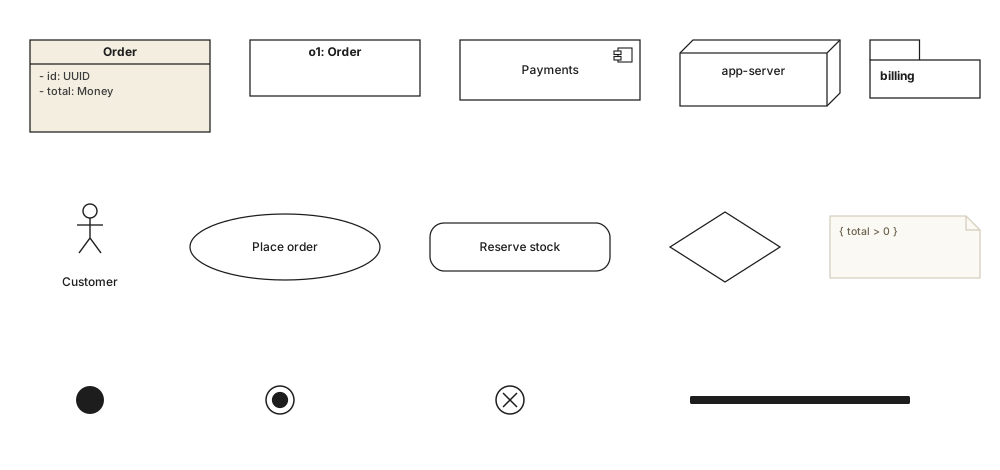
UML compte moins de symboles que sa réputation ne le laisse croire. Retirez celles qui n'apparaissent que sur un seul type de diagramme et une douzaine de formes portent toute la langue. Chacune est une affirmation sur la nature de ce qui est dans la boîte, et choisir la mauvaise n'est pas une maladresse cosmétique mais un énoncé : une ellipse là où va un rectangle arrondi dit « but que l'utilisateur poursuit » là où vous vouliez dire « étape que le système exécute ».
| Élément | Notation | Ce que cela signifie |
|---|---|---|
| Rectangle | ▭ | Un classificateur : une classe, un artefact, un participant. La forme par défaut, celle sur laquelle tous les autres diagrammes de structure se construisent. |
| Rectangle, nom souligné | o1: Order | Une instance plutôt qu'un type - une commande précise, sur un diagramme d'objets. Le soulignement fait toute la différence. |
| Rectangle à icône de composant | ▭ ⊟ | Une unité remplaçable dotée d'interfaces, sur un diagramme de composants. L'icône se place en haut à droite et c'est la seule chose qui le distingue d'une classe. |
| Boîte en trois dimensions | ▱ | Un nœud - matériel, conteneur, environnement d'exécution - sur un diagramme de déploiement. |
| Dossier à onglet | 🗀 | Un espace de noms, sur un diagramme de paquetages. |
| Ellipse | ⬭ | Un cas d'utilisation : quelque chose qu'un acteur veut accomplir, sur un diagramme de cas d'utilisation. Jamais une étape, jamais un écran. |
| Bonhomme bâton | ☺ | Un acteur : un rôle hors de la frontière du système. Ce peut être une personne, un autre système ou une horloge, et c'est pourquoi la figure est un rôle et non un portrait. |
| Rectangle arrondi | ▢ | Une action sur un diagramme d'activité, ou un état sur un diagramme d'états. Même forme, deux sens : la notation environnante tranche. |
| Losange | ◇ | Une décision, quand une branche est prise, ou une fusion, quand plusieurs se rejoignent. Même glyphe dans les deux cas ; le nombre de flèches dit lequel. |
| Barre pleine | ▬ | Une bifurcation, quand tout ce qui suit s'exécute en parallèle, ou une jonction, quand tout ce qui précède doit d'abord finir. |
| Disque plein | ● | Le nœud initial ou pseudo-état initial : là où le flux commence. |
| Disque cerclé | ◉ | Fin d'activité ou état final : tout le flux est terminé. |
| Cercle barré | ⊗ | Fin de flux. Il termine ce jeton, pas l'activité - la distinction sur laquelle butent la plupart des premiers jets. |
| Coin plié | 🗒 | Une note ou une contrainte, rattachée par un trait pointillé. Des accolades à l'intérieur en font une contrainte qui doit tenir. |
Les formes de nœuds, et les diagrammes auxquels elles appartiennent.
02Les six traits que tous les diagrammes partagent#
Les traits de relation sont la partie d'UML qu'il vaut la peine d'apprendre une fois, parce qu'ils se dessinent à l'identique partout où ils apparaissent. Un triangle creux veut dire la même chose entre deux classes, deux composants, deux cas d'utilisation et deux nœuds : l'investissement s'amortit sur les quatorze types de diagrammes.
| Élément | Notation | Ce que cela signifie |
|---|---|---|
| Association | Un trait simple. Les deux extrémités se connaissent, et les multiplicités de part et d'autre disent combien. | |
| Généralisation | Trait plein, triangle creux du côté général. « Est une sorte de » : héritage, spécialisation, sous-type. | |
| Réalisation | Trait pointillé, triangle creux. La source implémente le contrat que la cible déclare. Interfaces, pas héritage. | |
| Composition | Losange plein du côté du tout. La partie appartient à un tout et meurt avec lui. | |
| Agrégation | Losange creux du côté du tout. Une lecture tout/partie sans prétention de propriété, et sans sémantique formelle en UML 2.5.1. | |
| Dépendance | Pointillé, flèche ouverte. La source utilise la cible - un paramètre, un type de retour, un appel statique - sans la détenir. |
Deux règles rendent tout cela récupérable de mémoire plutôt que d'un tableau. D'abord, c'est l'extrémité décorée qui compte : le triangle pointe vers le plus général, le losange se pose sur le tout propriétaire, la flèche ouverte pointe vers ce qui est utilisé. Ensuite, le pointillé affaiblit l'affirmation pleine : le triangle plein est de l'héritage et le triangle pointillé seulement un contrat ; un trait plein est un lien structurel et un trait pointillé un simple usage.
03Les traits, dessinés les uns contre les autres#
Les pointes de flèches se distinguent mal dans un texte et bien côte à côte. Ci-dessous, les quatre traits les plus confondus sont dessinés entre le même genre de boîtes à la même échelle, de sorte que la différence soit la pointe et rien d'autre.

De gauche à droite : Customer et Order sont simplement associés, de un à plusieurs. CardPayment généralise Payment - le triangle creux pointe vers le haut, vers le classificateur plus général. Invoice réalise l'interface Printable, et le pointillé fait toute la différence avec le trait voisin. Basket dépend de PriceService, l'utilisant sans le posséder.
04Les symboles propres à un seul diagramme#
Une poignée de marques appartiennent à exactement un type de diagramme. Elles valent d'être reconnues précisément parce qu'elles identifient le diagramme : en voir une vous dit ce que vous lisez.
| Élément | Notation | Ce que cela signifie |
|---|---|---|
| Ligne de vie | ▭ + ┆ | Une boîte surmontant un trait vertical pointillé - uniquement les diagrammes de séquence. Le rectangle étroit posé sur la ligne est une occurrence d'exécution. |
| Fragment combiné | alt / loop / opt | Une boîte avec une étiquette pentagonale dans le coin, entourant une partie d'un diagramme de séquence pour la rendre conditionnelle ou répétée. |
| Include / extend | «include» | Une flèche ouverte pointillée avec un mot-clé, sur un diagramme de cas d'utilisation. Le mot-clé est porteur : les deux vont en sens inverse. |
| Frontière du sujet | ▭ autour | Le rectangle dessiné derrière les cas d'utilisation. À l'intérieur, le système ; les acteurs restent dehors. |
| Deploy | «deploy» | Une flèche pointillée posant un artefact sur un nœud. Jamais l'inverse. |
| Boule et cupule | —○ ⊃— | Une interface fournie (sucette) rencontrant une interface requise (cupule), sur un diagramme de composants. La paire est un connecteur. |
| Couloir | │ │ │ | Une partition sur un diagramme d'activité. Le couloir dans lequel se trouve une action dit qui en est responsable. |
| Pied-de-corbeau | —‹ | Pas de l'UML du tout. Une extrémité à trois branches veut dire « plusieurs » en notation ER : si vous en voyez une, vous lisez un modèle de données, pas un diagramme de classes. |
05Décorations : guillemets, accolades, crochets#
Trois sortes de ponctuation apparaissent sur les diagrammes UML et chacune veut dire quelque chose de précis. On les survole facilement, et chacune porte plus d'information par caractère que la forme sur laquelle elle est posée.
| Élément | Notation | Ce que cela signifie |
|---|---|---|
| Guillemets | «interface» | Un stéréotype : une extension du vocabulaire standard, définie par UML lui-même ou par un profil. On écrit <<…>> là où le caractère manque. |
| Accolades | { ordered } | Une contrainte qui doit tenir - sur une extrémité, un attribut ou dans une note. Les plus courantes sont { ordered }, { unique } et { readOnly }. |
| Crochets | [approved] | Une garde sur une transition ou un flux. L'arc n'est pris que si la condition est vraie, et les gardes sortant d'une décision devraient être exhaustives. |
| Marqueurs de visibilité | + - # ~ | Public, privé, protégé et paquet, devant un nom de membre. |
| Multiplicité | 0..* 1 2..5 | Combien d'instances participent, écrit au bout du trait auquel cela s'applique. Une multiplicité absente veut dire non spécifiée, pas une. |
| Soulignement | static | Appartient au classificateur plutôt qu'à une instance - ou, sur une boîte entière, que la boîte est une instance. |
06Ce qu'il faut retenir#
En une ligne chacun
- 01Les formes identifient le diagramme ; les traits portent le sens. Lisez-les dans cet ordre.
- 02L'extrémité décorée d'un trait est celle qui compte : triangle du côté général, losange du côté du tout, flèche du côté de l'utilisé.
- 03Le pointillé affaiblit toujours l'affirmation pleine : réalisation et non héritage, usage et non structure, réponse et non appel.
- 04Le même rectangle arrondi est une action sur un diagramme d'activité et un état sur un diagramme d'états.
- 05Guillemets, accolades et crochets sont de la notation, pas de l'annotation. Les enlever change ce que le diagramme dit.
07Questions fréquentes#
Quels sont les symboles de base des diagrammes UML ?
Un rectangle est un classificateur - classe, composant ou artefact. Une ellipse est un cas d'utilisation, un bonhomme bâton un acteur, un rectangle arrondi une action ou un état, et un losange une décision. Un disque plein démarre un flux, un disque cerclé le termine. Le sens est porté par les lignes : la pointe indique la relation.
Comment savoir quel diagramme UML j'ai sous les yeux ?
Lisez les formes avant les lignes. Bonshommes bâtons et ellipses signifient diagramme de cas d'utilisation, boîtes arrondies avec disque de départ plein signifient activité ou machine à états, lignes de vie verticales avec flèches horizontales signifient séquence, et rectangles simples avec losanges et triangles signifient classes. Les boîtes 3D signifient déploiement.
Que signifie une ligne pointillée en UML ?
Le pointillé affaiblit toujours ce qu'affirme la version pleine. Pointillé avec flèche ouverte : une dépendance, un usage sans possession. Pointillé avec triangle creux : une réalisation, pas un héritage. Pointillé vers une boîte à coin plié : une note. Et dans un diagramme de séquence, c'est une réponse et non un appel.
Les symboles UML sont-ils identiques dans les quatorze types de diagrammes ?
Les lignes oui, les boîtes non. Généralisation, association, dépendance et réalisation se dessinent partout de la même façon, ce qui rend leur apprentissage rentable. Les formes de nœuds sont propres à chaque diagramme, et c'est voulu : c'est ce qui permet de reconnaître un diagramme d'un coup d'œil.
Que signifie un rectangle à coin plié en UML ?
C'est une note : un commentaire, une contrainte ou une explication, rattachée par une ligne pointillée à ce qu'elle décrit. Le texte entre accolades est une contrainte qui doit tenir, par exemple { total > 0 }. Les notes n'ont aucune sémantique propre et s'attachent à n'importe quoi.
Dans cette série
- 01Qu'est-ce que UML ?
- 02Symboles UML
- 03Choisir un diagramme
- 04Diagrammes de classes
- 05Exemples de diagrammes de classes
- 06Dessiner un diagramme de classes
- 07Symboles du diagramme de classes
- 08Diagrammes de séquence
- 09Exemples de diagrammes de séquence
- 10Dessiner un diagramme de séquence
- 11Diagrammes de cas d'utilisation
- 12Exemples de cas d'utilisation
- 13Diagrammes d'activité
- 14Exemples d'activité
- 15Diagrammes états-transitions
- 16Exemples d'états-transitions
- 17Diagrammes de composants
- 18Exemples de composants
- 19Dessiner un diagramme de composants
- 20Symboles de composants
- 21Diagrammes de déploiement
- 22Exemples de déploiement
- 23Diagrammes d'objets
- 24Diagrammes de paquetages
- 25Diagrammes de structure composite
- 26Diagrammes de communication
- 27Séquence vs communication
- 28Diagrammes de temps
- 29Diagrammes globaux d'interaction
- 30Diagrammes de profil
- 31UML avec l'IA
- 32Exemple e-commerce
- 33Exemple bancaire
- 34Exemple microservices
- 35Exemple AWS
À lire aussi
Fondamentaux
Référence de notation
Référence de notation
Diagrammes de structure
Fondamentaux
Diagrammes de structure