UML diagram symbols
One page for the whole shape vocabulary: which glyph belongs to which of the fourteen diagrams, what every arrowhead means, and how to identify a diagram from its symbols before reading a word of it.
8 min readUML 2.5.12 of 35
The short answer
- Read the shapes before the lines. Stick figures and ellipses mean use case, lifelines mean sequence, 3D boxes mean deployment.
- The lines are the same in all fourteen diagrams; the boxes are not. Learn the four arrowheads once and they pay off everywhere.
- A dash always weakens the claim the solid version makes: dependency instead of association, realization instead of inheritance.
- A folded-corner rectangle is a note and carries no semantics. Text in curly braces inside it is a constraint that must hold.
01The shapes, and what each one commits you to#
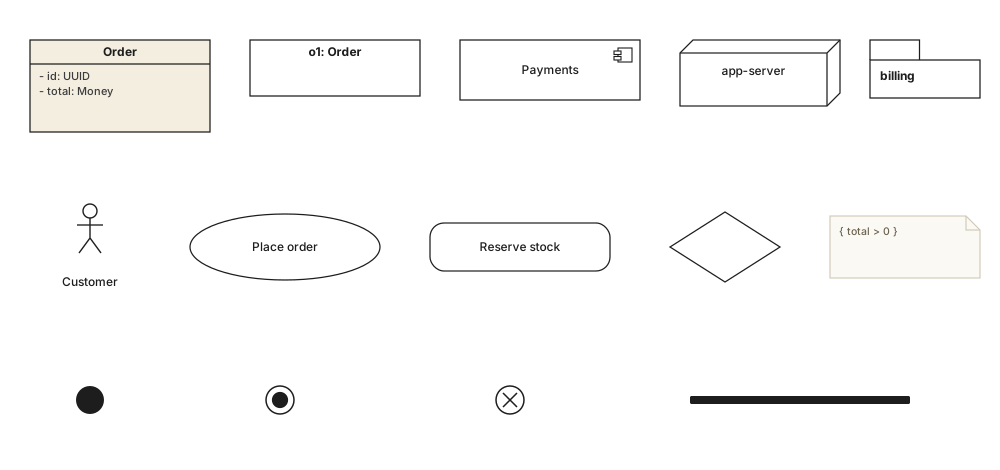
UML has fewer symbols than its reputation suggests. Strip away the ones that appear on a single diagram type and about a dozen shapes carry the whole language. Each one is a claim about what kind of thing is in the box, and picking the wrong one is a statement, not a cosmetic slip - an ellipse where a rounded rectangle belongs says “goal the user has” where you meant “step the system runs”.
| Element | Notation | What it means |
|---|---|---|
| Rectangle | ▭ | A classifier: a class, an artifact, a participant. The default shape, and the one every other structure diagram builds on. |
| Rectangle, underlined name | o1: Order | An instance rather than a type - one specific order, on an object diagram. The underline is the whole difference. |
| Rectangle with component icon | ▭ ⊟ | A replaceable unit with interfaces, on a component diagram. The icon sits top-right and is the only thing distinguishing it from a class. |
| 3D box | ▱ | A node - hardware, a container, an execution environment - on a deployment diagram. |
| Tabbed folder | 🗀 | A namespace, on a package diagram. |
| Ellipse | ⬭ | A use case: something an actor wants to achieve, on a use case diagram. Never a step, never a screen. |
| Stick figure | ☺ | An actor: a role outside the system boundary. It can be a person, another system or a clock, which is why the figure is a role and not a portrait. |
| Rounded rectangle | ▢ | An action on an activity diagram, or a state on a state machine. The same shape, two meanings - the surrounding notation disambiguates. |
| Rhombus | ◇ | A decision, when one branch is taken, or a merge, when several come back together. Same glyph both ways; the arrow count tells you which. |
| Solid bar | ▬ | A fork, when everything downstream runs concurrently, or a join, when everything upstream must finish first. |
| Filled disc | ● | The initial node or initial pseudostate: where the flow starts. |
| Ringed disc | ◉ | Activity final or final state: the whole flow is over. |
| Crossed circle | ⊗ | Flow final. It ends this token, not the activity - the distinction that trips up most first drafts. |
| Folded corner | 🗒 | A note or a constraint, attached by a dashed line. Curly braces inside it make it a constraint that has to hold. |
The node shapes, and the diagrams that own them.
02The six lines every diagram shares#
The relationship lines are the part of UML worth learning once, because they are drawn identically wherever they appear. A hollow triangle means the same thing between two classes, two components, two use cases and two nodes, so the investment amortises across all fourteen diagram types.
| Element | Notation | What it means |
|---|---|---|
| Association | A plain line. The two ends know about each other, and multiplicities at either end say how many. | |
| Generalization | Solid line, hollow triangle at the general end. “Is a kind of” - inheritance, specialization, subtype. | |
| Realization | Dashed line, hollow triangle. The source implements the contract the target declares. Interfaces, not inheritance. | |
| Composition | Filled diamond at the whole. The part belongs to one whole and dies with it. | |
| Aggregation | Hollow diamond at the whole. A whole/part reading with no ownership claim, and no formal semantics in UML 2.5.1. | |
| Dependency | Dashed, open arrow. The source uses the target - a parameter, a return type, a static call - without holding it. |
Two rules make these recoverable from memory rather than from a table. First, the decorated end is the end that matters: the triangle points at the more general thing, the diamond sits on the owning whole, the open arrow points at what is being used. Second, a dash weakens the solid claim: solid triangle is inheritance and dashed triangle is only a contract; a solid line is a structural link and a dashed one is mere usage.
03The lines, drawn against each other#
Arrowheads are hard to tell apart in prose and easy to tell apart side by side. Below, the four most-confused lines are drawn between the same kind of boxes at the same scale, so the difference is the head and nothing else.

Left to right: Customer and Order are simply associated, one to many. CardPayment generalizes Payment - the hollow triangle points up at the more general classifier. Invoice realizes the Printable interface, and the dash is the entire difference between that and the line beside it. Basket depends on PriceService, using it without owning it.
04Symbols that only appear on one diagram#
A handful of marks belong to exactly one diagram type. They are worth recognising precisely because they identify the diagram: seeing one tells you what you are reading.
| Element | Notation | What it means |
|---|---|---|
| Lifeline | ▭ + ┆ | A box with a dashed vertical line under it - sequence diagrams only. The thin rectangle on the line is an execution occurrence. |
| Combined fragment | alt / loop / opt | A box with a pentagon name tag in its corner, wrapping part of a sequence diagram to make it conditional or repeated. |
| Include / extend | «include» | A dashed open arrow with a keyword, on a use case diagram. The keyword is load-bearing: the two point in opposite directions. |
| Subject boundary | ▭ around | The rectangle drawn behind the use cases. Inside is the system; the actors stay outside it. |
| Deploy | «deploy» | A dashed arrow putting an artifact onto a node. Never the reverse. |
| Ball and socket | —○ ⊃— | A provided interface (lollipop) meeting a required one (socket), on a component diagram. The pair is a connector. |
| Swimlane | │ │ │ | A partition on an activity diagram. Which lane an action sits in says who is responsible for it. |
| Crow's foot | —‹ | Not UML at all. A three-pronged end means “many” in ER notation - if you see one, you are reading a data model, not a class diagram. |
05Decorations: guillemets, braces, brackets#
Three kinds of punctuation appear on UML diagrams and each one means something specific. They are easy to skim past, and each carries more information per character than the shape it sits on.
| Element | Notation | What it means |
|---|---|---|
| Guillemets | «interface» | A stereotype: an extension of the standard vocabulary, defined by UML itself or by a profile. Written <<…>> where the character is unavailable. |
| Curly braces | { ordered } | A constraint that must hold - on an end, an attribute or in a note. Common ones are { ordered }, { unique } and { readOnly }. |
| Square brackets | [approved] | A guard on a transition or a flow. The edge is only taken when the condition holds, and the guards leaving one decision should be exhaustive. |
| Visibility markers | + - # ~ | Public, private, protected and package, before a member name. |
| Multiplicity | 0..* 1 2..5 | How many instances participate, written at the end of the line it applies to. A missing multiplicity means unspecified, not one. |
| Underline | static | Belongs to the classifier rather than an instance - or, on a whole box, that the box is an instance. |
06What to remember#
In one line each
- 01Shapes identify the diagram; lines carry the meaning. Read them in that order.
- 02The decorated end of a line is the end that matters: triangle at the general, diamond at the whole, arrow at the used.
- 03A dash always weakens the solid claim - realization not inheritance, usage not structure, reply not call.
- 04The same rounded rectangle is an action on an activity diagram and a state on a state machine.
- 05Guillemets, braces and brackets are notation, not annotation. Dropping them changes what the diagram says.
07Common questions#
What are the basic symbols used in UML diagrams?
A rectangle is a classifier - a class, component or artifact. An ellipse is a use case, a stick figure is an actor, a rounded rectangle is an action or a state, and a rhombus is a decision. A filled disc starts a flow and a ringed disc ends one. Lines carry the meaning: the arrowhead says which relationship it is.
How do I tell which UML diagram I am looking at?
Read the shapes before the lines. Stick figures and ellipses mean a use case diagram, rounded boxes with a filled start disc mean activity or state machine, vertical lifelines with horizontal arrows mean sequence, and plain rectangles with diamonds and triangles mean class. 3D boxes mean deployment.
What does a dashed line mean in UML?
A dash always weakens the claim the solid version makes. Dashed with an open arrow is a dependency - use without ownership. Dashed with a hollow triangle is realization rather than inheritance. Dashed to a folded-corner box attaches a note, and a dashed line in a sequence diagram is a reply rather than a call.
Are UML symbols the same across all fourteen diagram types?
The lines are; the boxes are not. Generalization, association, dependency and realization are drawn identically wherever they appear, which is why learning them once pays off. The node shapes are specific to each diagram, and that is deliberate - it is what lets you identify a diagram at a glance.
What does a rectangle with a folded corner mean in UML?
It is a note: a comment, a constraint or an explanation, attached to whatever it describes by a plain dashed line. Text in curly braces inside it is a constraint that must hold, such as { total > 0 }. Notes carry no semantics of their own and can be attached to anything.
In this series
- 01What is UML?
- 02UML symbols
- 03Choosing a diagram
- 04Class diagrams
- 05Class diagram examples
- 06How to draw a class diagram
- 07Class diagram symbols
- 08Sequence diagrams
- 09Sequence diagram examples
- 10How to draw a sequence diagram
- 11Use case diagrams
- 12Use case examples
- 13Activity diagrams
- 14Activity examples
- 15State machine diagrams
- 16State machine examples
- 17Component diagrams
- 18Component examples
- 19Drawing a component diagram
- 20Component symbols
- 21Deployment diagrams
- 22Deployment examples
- 23Object diagrams
- 24Package diagrams
- 25Composite structure diagrams
- 26Communication diagrams
- 27Sequence vs communication
- 28Timing diagrams
- 29Interaction overview diagrams
- 30Profile diagrams
- 31UML with AI
- 32E-commerce example
- 33Banking example
- 34Microservices example
- 35AWS example
Related reading
Foundations
Notation reference
Notation reference
Structure diagrams
Foundations
Structure diagrams